

 Motorcycle
 On the road


 Apparel

Choosing navigation for the BMW GS also means solving mounting, power supply and possible handlebar control. We will clearly compare standalone Garmin and BMW navigation systems, phone mounts, and displays with Apple CarPlay and Android Auto for motorcycles with or without the original navigation preparation.
On the BMW GS, you can use a standalone GPS navigation system, a phone in a mount, or a durable display with Apple CarPlay and Android Auto. First decide whether you want navigation that works independently or map applications from your phone. Then choose the mounting according to whether your motorcycle has the original BMW navigation preparation.
Owners of touring boxers and smaller GS models have the same options to choose from. However, the specific mount, adapter and availability of controls always depend on the model, year of manufacture and equipment. The mere label “for BMW” does not yet say what will work on your motorcycle.
Quick decision
- Do you want to navigate without a phone? Choose a standalone GPS, such as Garmin zūmo or BMW ConnectedRide Navigator.
- Do you want map applications from your phone while keeping the phone off the handlebars? Choose a CarPlay / Android Auto display.
- Do you want to use the phone screen directly? You need a suitable mount and well-designed charging.
- Do you have BMW preparation? Use direct mounting of a compatible device or an adapter. Without the preparation, choose a mount for the handlebars or crossbar and a separate power supply.
What you will find in the article
- Overview of the three basic solutions
- How to recognize BMW navigation preparation
- Garmin: classic mounting, adapters and wheel control
- Original BMW navigation
- Phone in a mount: with or without preparation
- Wired and wireless phone charging
- How CarPlay and Android Auto work
- Displays directly in the BMW mount
- Universal displays and mounting via an adapter
- Retrofitting BMW preparation
- Recommendations based on how you use it
- Frequently asked questions
- Videos: tests and introductions to individual products
1. GPS navigation, phone, or standalone display?
| Solution | How it works and who it suits |
|---|---|
| Standalone GPS navigation | It has its own navigation system and maps. Basic navigation using stored maps does not require a phone or mobile data. Suitable for riders who want a standalone device and work with their own routes. |
| Phone in a mount | The map application runs on the phone and you follow its screen. A practical choice if you want to use the phone environment directly and invest primarily in a mount and charging. |
| CarPlay / Android Auto display | The supported application runs on the phone but is displayed on a separate motorcycle display. The phone can remain stored in a pocket or luggage. To navigate from the phone, it must be connected and charged. |
Offline maps are not exclusive to classic navigation systems. You can also use them in supported phone applications. However, download maps of the required areas before your trip and test navigation without mobile data in advance. Live traffic information and other online services have their own connection requirements.
2. What BMW navigation preparation means
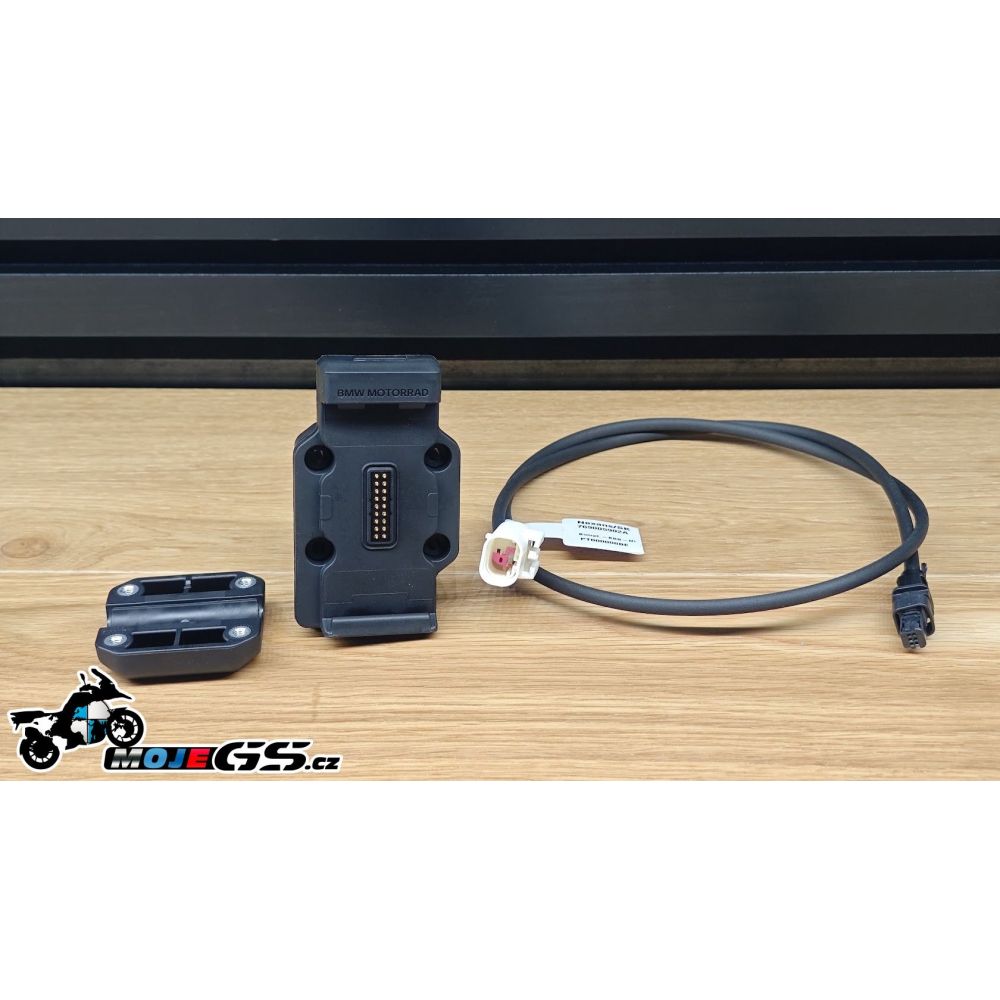
Original BMW navigation preparation is a mount with electrical contacts into which a compatible navigation system or accessory is clipped. On common BMW Navigator Nav Prep 5/6 versions, it also handles power supply and device locking. On supported motorcycles, it may also transmit commands from the rotary controller and data from the motorcycle.
Check three things before ordering
- Do you actually have an electric BMW mount? The crossbar above the instruments or a loose power connector alone is not complete navigation preparation.
- How is the mount locked? Distinguish between the key-locked version and the newer mount with electric release. The adapter may require the corresponding lock version.
- Do you have a Multi-Controller rotary control? The wheel next to the left grip, also known as the Wonder Wheel, must support the selected device and the relevant motorcycle configuration.
Mounting, power supply, controls and data reading are four separate features. A device may sit in the mount and charge, yet still not respond to the wheel or display tire pressure. With older GS models and retrofitted preparation, therefore verify each required function separately.
3. Garmin zūmo: classic navigation for the BMW GS
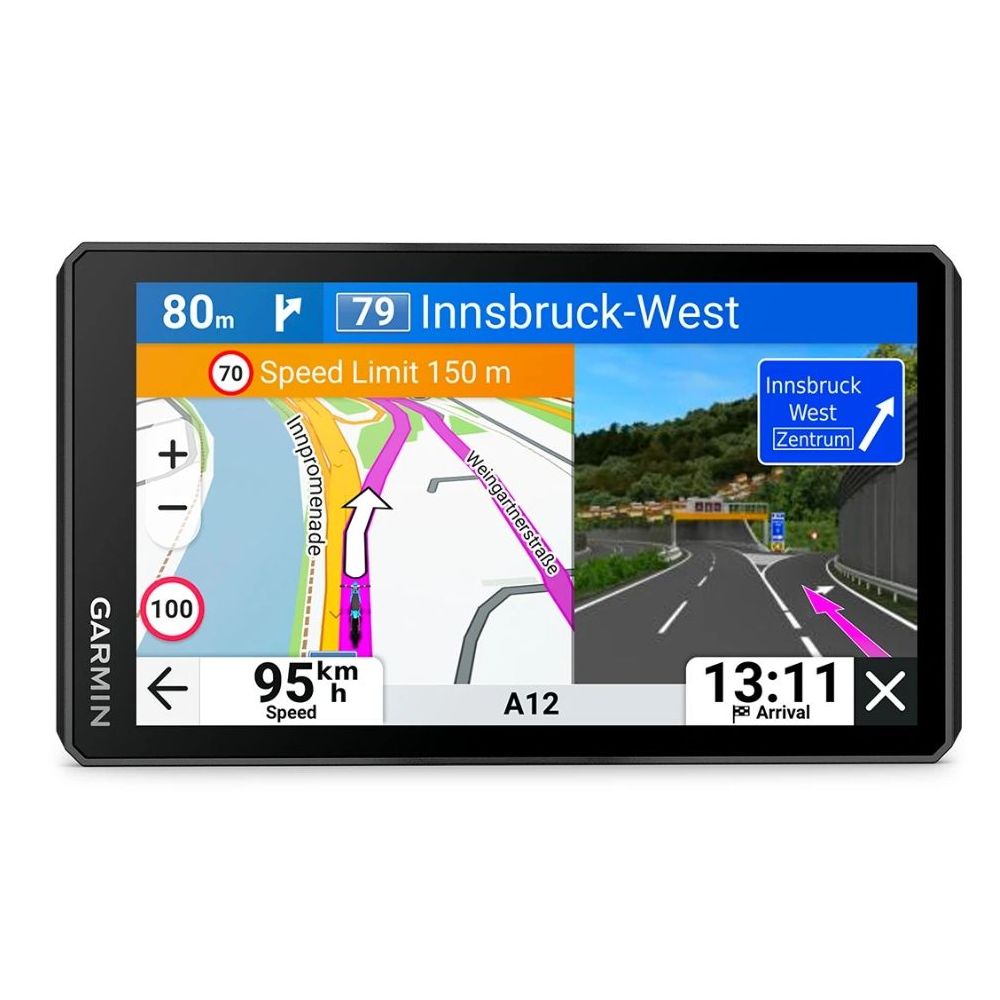
Garmin zūmo makes sense if you want to keep navigation separate from your phone. Maps and route calculation are in the navigation device; you can connect your phone for additional services. The current range includes Garmin zūmo XT3 with a 6″ display. If you already own a zūmo XT or XT2, focus especially on the correct cradle and adapter for that generation.
A. Classic mounting on the handlebars or above the instruments
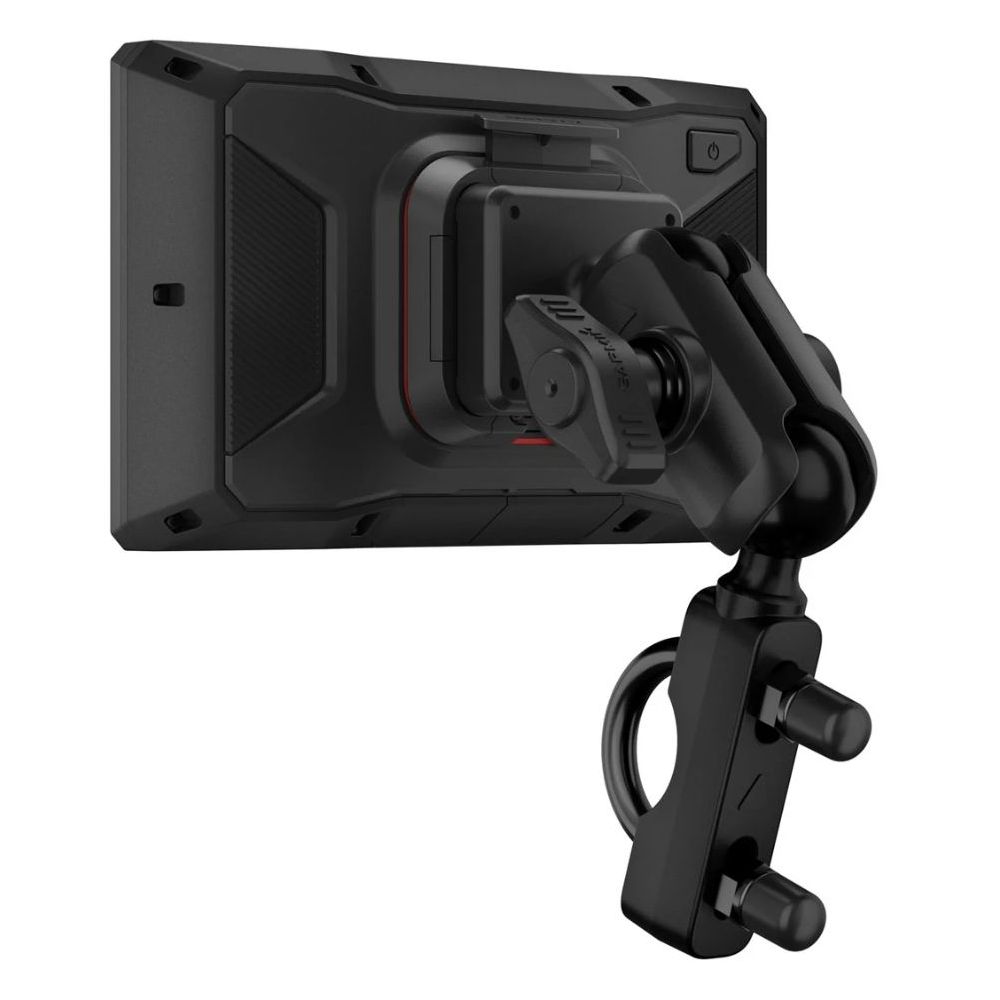
The original BMW mount is not necessary for using Garmin. You can attach the Garmin power cradle using a handlebar mounting kit or a suitable crossbar mount. With the tested 6″ zūmo XT3, the motorcycle mount, mounting kit and power cable are included in the package. With this mounting method, the power supply is connected separately.
For positioning above the instruments, depending on the motorcycle, you can use GPS mount for R1250GS / Adventure and R1200GS LC / Adventure without original preparation, 12mm crossbar for R1300GS / Adventure without factory GPS preparation or GPS mount for a crossbar with a diameter of 10–12 mm. With the last option, you must already have a suitable crossbar on the motorcycle.
What you need for classic Garmin mounting
- The navigation device and its power cradle. When buying a used navigation device, check what you actually receive with it.
- Mechanical mounting. The handlebar kit included in the package or a suitable mount above the instruments; alternatively, a crossbar and mount with the corresponding diameter.
- Power cable and correct connection. Use the solution specified for the particular cradle, with appropriate protection and power mode.
B. Garmin in the original BMW preparation via an adapter
If the GS has BMW preparation, you do not need to install a second mount and run new power wiring for Garmin. A suitable adapter uses the existing BMW mount; the corresponding Garmin cradle is fitted to it, and the navigation device goes into the cradle. It is important not to confuse the first zūmo XT with XT2 or XT3.
| Navigation device and adapter | Power supply and controls |
|---|---|
| zūmo XT, 5,5″ BMW Navigator → zūmo XT adapter |
Uses power from the BMW mount. This common adapter does not transmit wheel control. You need the cradle for the first XT. |
| zūmo XT2 / XT3, 6″ Standard BMW Navigator → XT2 / XT3 adapter |
Uses power from the BMW mount. This adapter also handles mounting and power without wheel control. You need the corresponding Garmin cradle. |
| zūmo XT2 / XT3, 6″ + Wonder Wheel TeqMount adapter with handlebar control support |
On compatible BMW models, it also transmits wheel commands, such as map zoom and configurable shortcuts. It requires a supported motorcycle configuration and Garmin settings. |
The Garmin power cradle is not included with the listed adapters. You use the one from your navigation device package. If you are equipping another motorcycle, you can add a replacement power mount for the 6″ zūmo XT2 / XT3.
C. Controlling Garmin with the BMW wheel
For XT2 and XT3, there is a specific TeqMount solution that converts movements of the BMW wheel into commands for a supported Garmin remote control. You can change the map zoom by rotating it and assign additional functions to sideways movements. The range of control corresponds to these commands; it does not automatically provide access to every touch element of the navigation device.
Before ordering, verify the GS model, preparation type and lock type. For standalone Garmin mounting, security can also be added using the lockable Wunderlich mount for zūmo XT / XT2 / XT3. Check locking as a feature of the entire assembly, including the cradle and adapter.

Video: installing TeqMount in the BMW mount
Installation demonstration · WayPoint · 1:38
A short demonstration of fitting the adapter, switching NAV / TFT control and installing the lock. The video shows Garmin XT2; for XT3, choose the cradle and assembly corresponding to the specific navigation version.
4. Original BMW navigation: Navigator and ConnectedRide Navigator
If you already have BMW Navigator V or VI, you can continue using it in the corresponding preparation. For owners of a compatible BMW who are choosing a new standalone navigation device with motorcycle integration, another option is BMW ConnectedRide Navigator. It has its own navigation system, a 5,5″ display and, in supported preparation, is powered and controlled using the Multi-Controller.
It uses the phone, for example, for calls and media; routes can be synchronized with the BMW Motorrad Connected app. With this product on MojeGS, the motorcycle mount is not included in the package. Therefore, also check the compatible navigation preparation when choosing.
Beware of Similar Names
- ConnectedRide Navigator: standalone navigation with its own display and map system.
- ConnectedRide Cradle: mobile phone holder. You view navigation on your phone in the BMW Motorrad Connected app.
- BMW Nav Prep / navigation preparation: basic mount on the motorcycle for installing a compatible navigation device, Cradle, or display with the appropriate adapter.
5. Mobile Phone as a Navigation Device
A phone in a holder is practical if you want to use its screen and your map apps directly. When choosing a holder, consider the phone dimensions including the case, the position of the side buttons, space for the charging cable, and vibration damping. The screen size in inches alone is not sufficient for choosing one.
A. Phone without BMW preparation: handlebar or crossbar mount
One option is the shock-absorbing Interphone Smartlock Crab PRO. It is designed for phones 60–90 mm wide and handlebars or crossbars with a diameter of 12–32 mm. It has damped mounting and a quick-release mechanism; charging the phone must be solved separately.
If you want a holder with charging, you can choose the Interphone Crab with wireless charging and USB-C. It supports phones 65–90 mm wide, wireless Qi charging up to 15 W, and wired charging via USB-C. Its power supply connects to the motorcycle's electrical system.
B. Phone in BMW preparation via QUIKLOX
For regular phone map apps, you can use the original preparation with the shock-absorbing BMW Navigator → QUIKLOX adapter with USB-A and USB-C. Attach the QUIKLOX universal phone holder or a compatible case to it. The adapter draws power from the BMW mount; you then charge the phone with your own cable.
Phone assembly for BMW preparation
- BMW Navigator → QUIKLOX adapter for mounting and USB power.
- QUIKLOX phone holder for phone widths of 60–90 mm; this item alone does not include the BMW adapter.
- Charging cable with a connector for your phone.
- Alternatively, a waterproof QUIKLOX phone case for phones up to 175 × 90 mm, with a cable gland.
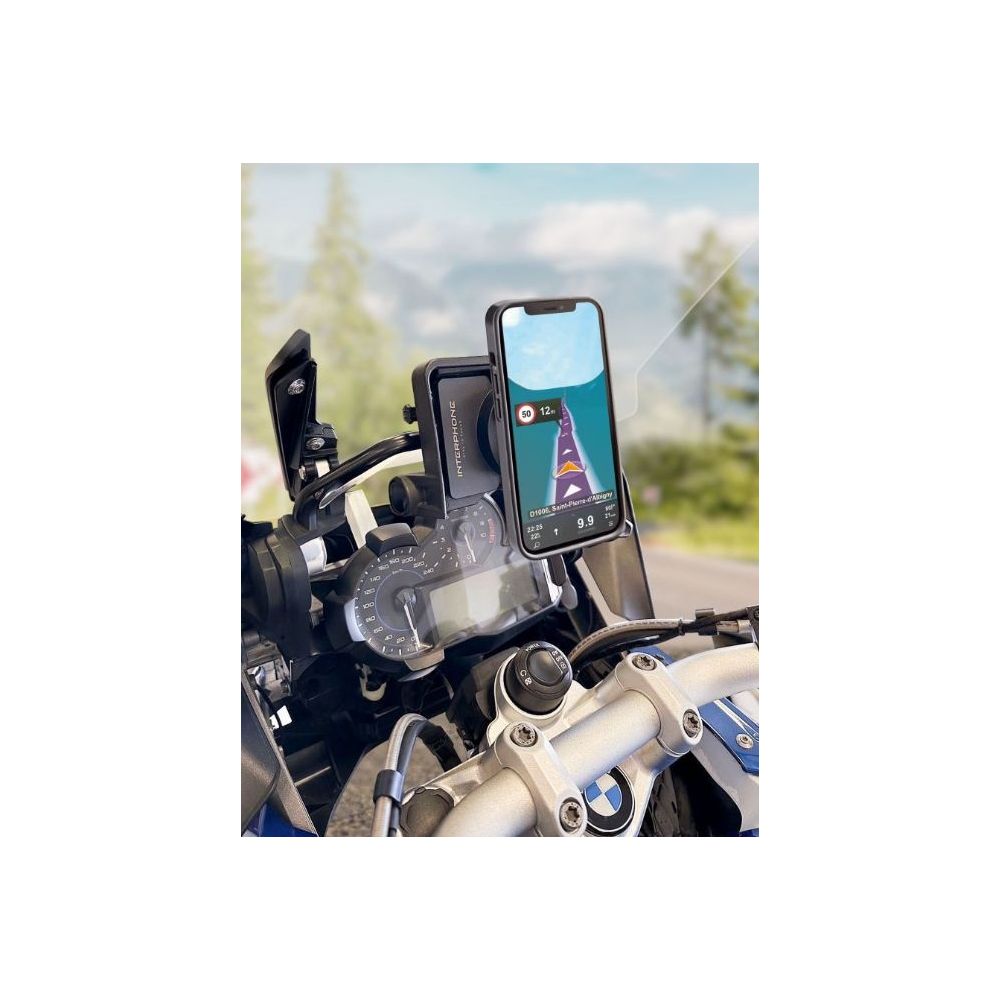
This assembly provides phone mounting and charging. It does not provide control of arbitrary apps using the BMW wheel. Check separately whether the dimensions of the phone including its case match the selected holder.
C. BMW ConnectedRide Cradle: phone and BMW app
The BMW ConnectedRide Cradle is suitable if you want to use your phone with the BMW Motorrad Connected app and control its supported functions with the BMW wheel on a compatible motorcycle. The phone connects to the Cradle via Bluetooth; you can charge it wirelessly using Qi or with a cable from the USB-C port.
For this variant, BMW specifies phone dimensions from 130.1 × 65.5 × 6.9 mm to 162.5 × 78.1 × 8.8 mm. Check the actual dimensions of your phone and its case. Larger current phones may not fit within this range. The controls apply to the BMW app, not automatically to every app on the phone.
Phone and vibrations
Sensitive camera stabilization can be damaged by prolonged exposure to vibrations. Choose damped mounting in accordance with the phone manufacturer's instructions. BMW recommends removing the phone from the ConnectedRide Cradle before off-road riding and after very rough roads. If you want to keep your main phone out of the holder, consider a separate CarPlay / Android Auto display.
Video: BMW ConnectedRide Cradle in Practice
Feature demonstration · Hobbyfahrer · 4:58
Demonstration of using a phone in the ConnectedRide Cradle and the functions of the BMW Motorrad Connected app. It shows an older version of the app; the current interface may look different.
6. Charging the Phone: by Cable, Wirelessly, and in Luggage
Choose phone mounting and charging together. During navigation, the phone needs power even when you use its screen less or an app is running on a separate display. For longer trips, prepare the power supply so that the phone does not lose charge while riding.
| Option | What you need and what to consider |
|---|---|
| USB from a small BMW socket | An adapter with USB-C and USB-A for the BMW mini socket enables charging without installing a new socket. Check the socket's availability and location, cable length, and charging power for your phone. |
| Replacement for the original USB socket | A USB-C + USB-A socket instead of the original small BMW socket is an option for the models listed in the product compatibility. Before replacement, compare the connector, mounting space, and the specific motorcycle version. |
| Power from the navigation preparation | With a QUIKLOX adapter, use USB and a cable. ConnectedRide Cradle supports Qi and wired charging. The BMW mount itself charges the phone only through suitable accessories. |
| Wireless Qi | This requires phone support, a charging holder, and correct phone positioning. Also check whether the case is suitable. If it overheats, the phone may limit charging. |
| Phone in a tank bag or case | This is suitable when using CarPlay / Android Auto. Route the cable so that it does not bend sharply or compromise the luggage seal. For a more permanent installation, you can use USB power in the case. |
Wireless connection to the display does not mean wireless phone charging. CarPlay and Android Auto transmit apps; you must provide the phone's power separately. A phone stored in a pocket also needs a sufficiently charged battery or accessible charging during longer rides.
With wired charging, protect the connectors from water and mechanical strain. For a connection directly to the electrical system, address fusing and behavior after the ignition is switched off. When navigation, high brightness, and charging run simultaneously, also monitor the phone temperature, especially in direct sunlight or an enclosed case.
7. Apple CarPlay and Android Auto: the Phone Can Stay Stored
A motorcycle CarPlay / Android Auto display shows supported apps from the connected phone in an interface designed for riding. You use Apple CarPlay with an iPhone and Android Auto with a compatible Android phone. The displays mentioned here support wireless connection.
This solution is commonly called “phone mirroring,” but it is not a copy of the entire display and does not allow every mobile app to be launched. What is shown depends on CarPlay or Android Auto support in the specific app, its version, and any subscription.
| Apps | What is good to know |
|---|---|
| Mapy.com | Supports Android Auto and Apple CarPlay. Prepare a route with waypoints on your phone; download the necessary offline maps before the trip. |
| Google Maps and Waze | Common options for road navigation. Check the availability of live information and navigation without data according to the specific app and its settings. |
| calimoto | It also supports Android Auto, in addition to Apple CarPlay. Support for these displays is part of calimoto Premium. Test the specific phone and current app version before setting off. |
| BMW Motorrad Connected | You cannot assume that this app will be displayed via CarPlay or Android Auto. ConnectedRide Cradle is intended for controlling its map on the phone; ConnectedRide Navigator uses its own navigation system. |
To use navigation apps from your phone, you need a working connection to the phone. A built-in GPS module or SIM card in some displays does not automatically mean standalone navigation. For example, Chigee LTE functions extend remote services; CarPlay / Android Auto apps still run on the phone.
8. CarPlay / Android Auto Displays Directly into BMW Preparation
If you have compatible original navigation preparation, you can choose a device designed to be installed directly into its mount. For normal use of the display, this solves mounting and power supply. On supported motorcycles, you also gain Wonder Wheel control and, where applicable, motorcycle data.
| Display | How the individual options differ |
|---|---|
| Chigee AIO-5 Play for BMW 5″ |
A compact solution directly into the BMW preparation. Wheel and BMW data support depends on the motorcycle. This version does not support expansion with front and rear cameras. |
| Chigee AIO-6 Max pro BMW 6″ |
A display and BMW Quick-Release module set. Possibility of additional accessories, such as cameras and pressure sensors. When comparing offers, check whether the BMW module is actually included. |
| Chigee AIO-6 LTE 4G pro BMW 6″ |
BMW set with added remote LTE functions, such as location tracking and alerts. For these services, arrange a SIM, data plan, and service terms; a phone is still required for CarPlay / Android Auto. |
| Carpuride for BMW, BS version W502BS – 5″ W602BS – 6″ W702BS – 7″ |
Three display sizes with installation into BMW preparation and support for wheel control and data reading on compatible motorcycles. When choosing, do not automatically apply the features of the BS version to other similarly labeled models. |
| Interphone Sync55B pro BMW 5,5″ |
Direct installation into the original BMW preparation. Support for wheel control and data retrieval depends on motorcycle compatibility. Distinguish it from the universal RideSync. |
| INNOVV N3 pro BMW 6″ |
Version for the BMW mount with support for Wonder Wheel and motorcycle data. The referenced set also includes protective glass and a sun visor. |

What to prepare for a BMW display
- The correct BMW variant or a complete BMW set. With Chigee AIO-6, the corresponding Quick-Release module is decisive.
- A compatible original BMW mount. Check the mount version, lock, and space for the display.
- A phone supporting wireless CarPlay / Android Auto and the apps you want to use.
- Phone charging. Powering the display itself does not solve this need.
- Control operation and data. The scope varies according to the model, year, equipment and software.
With a newer electrically released cradle, check the display firmware. For the relevant new cradles, Chigee specifies at least version 1.6.2 for AIO-6 and at least 1.7.1 for AIO-5 Play for BMW. Requirements may continue to evolve, so check current support before installation. If the preparation is retrofitted, activating the relevant motorcycle equipment may also be necessary for wheel controls.
Choose the size according to the space in the cockpit. A smaller screen has more compact dimensions, while a larger one offers more space for the map. Before buying, check that it does not cover the instruments in the chosen position, restrict windscreen movement or get in the way when turning the handlebars.
9. Universal displays for GS without navigation preparation
Without the original BMW cradle, choose a universal device. The display is attached to the handlebars or a suitable crossbar and powered by its own wiring. Before ordering, compare the mounting diameter with the holder supplied in the package; for example, a 12mm crossbar may require different mounting than thicker handlebars.

| Universal solution | Mounting and important differences |
|---|---|
| Interphone RideSync, 5.5″ | QUIKLOX mounting, separate power supply. This model does not work with the BMW wheel. It can also be used with the corresponding BMW adapter. |
| Interphone RideSync 70, 7″ | The linked set contains a display, front and rear cameras, and valve-mounted pressure sensors. The cameras also mean additional installation and wiring. Similarly named sets may have different accessories. |
| Carpuride W603, 6.3″ | Universal display with a separate wired handlebar controller included. This is the device's own controller; it does not provide BMW Wonder Wheel control. |
| Chigee AIO-5 EVO, 5″ | Universal solution with front and rear cameras. This is a different version from AIO-5 Play for BMW; the mounting method and expansion options differ. |
| Chigee AIO-6 Max with universal kit Chigee AIO-6 LTE with universal kit |
Kits with a CG Quick-Release module for universal mounting and power supply. The module for this setup differs from BMW Quick-Release. Choose cameras and other accessories separately according to your needs. |
Universal RideSync in the original BMW cradle
If you already have a universal Interphone RideSync 5.5″ and a GS with BMW preparation, you can add a BMW adapter for RideSync / QUIKLOX with USB power supply. You will be able to use the original cradle and its power supply. However, the adapter will not add wheel control to the universal RideSync. If you require BMW integration, compare this setup with the Sync55B for BMW model.
What you need without BMW preparation
- Universal display and a compatible phone.
- Holder for the appropriate handlebar or crossbar diameter. Check the package contents and the available mounting space.
- Display power supply according to its instructions. For automatic switching, arrange a suitable switched supply and fuse protection.
- Separate phone charging.
- Additional parts according to the setup. Cameras require mounting and wiring; pressure sensors and remote controls must also be compatible with the given display.
10. Can BMW navigation preparation be added later?
Yes, suitable preparation can be added to a compatible motorcycle. For example, an original BMW navigation preparation with central electric locking is available. In addition to the cradle, however, you need suitable mechanical mounting, an appropriate electrical connection and space for the selected device.
Adding the cradle alone does not guarantee wheel control or data from the motorcycle. For a specific GS, check the available wiring, equipment and any activation of the navigation preparation. When mounting it on a motorcycle without the necessary data connection, you may gain mounting and power, while integration with the electronics remains limited.
Choose Chigee AIO-6 with the correct mounting module: BMW Quick-Release for compatible BMW preparation or CG Quick-Release for universal mounting. AIO-5 Play for BMW requires a compatible navigation cradle; a different variant is intended for conventional universal mounting.
11. Which solution to choose according to your needs
| What do you expect from navigation | Practical choice |
|---|---|
| Standalone navigation without a phone | Garmin zūmo. With BMW preparation, use the appropriate adapter; without preparation, use a motorcycle cradle and separate power supply. If you prefer the BMW system, compare ConnectedRide Navigator. |
| Garmin and BMW wheel control | 6″ zūmo XT2 / XT3 with a TeqMount adapter on a supported GS. Check the preparation, lock and scope of available controls. |
| Phone apps, phone stored away | CarPlay / Android Auto display. With BMW preparation, choose the direct BMW variant; without it, a universal setup with its own holder and wiring. |
| Using the phone directly on the handlebars | A dimensionally suitable vibration-damped holder and charging. With BMW preparation, a QUIKLOX setup is an option; without it, use a handlebar or crossbar holder. |
| BMW app on the phone with wheel control | ConnectedRide Cradle on a compatible motorcycle. Before choosing, check the phone dimensions and support for the required functions. |
| Cameras and other accessories | Compare the expandable Chigee AIO-6 range, universal AIO-5 EVO or the corresponding RideSync 70 set. Check the package contents and wiring requirements. |
Check the complete setup before the first ride
- Mounting: the device is held firmly, the lock and safety mechanisms work, and the phone does not press against its own buttons.
- Space: the handlebars turn freely to both extremes, the cable is not taut, and the display does not obstruct windscreen adjustment.
- Power: the display and phone are actually receiving power, and the setup behaves as expected after switching off.
- Controls: you have tested the touch controls, any wheel or separate controller.
- Apps: the required navigation is displayed, and the route and downloaded offline maps work.
- Intercom: you can hear the navigation instructions. Pair the phone, display and intercom according to the instructions for the specific devices; the connection method differs between models.
Perform the initial setup, pairing and route preparation while stationary. Before a longer trip, test the setup on a short ride, including phone charging and the audibility of navigation instructions.
12. Frequently asked questions about navigation on the BMW GS
Do I need the original BMW preparation to use Garmin?
You can use Garmin without it. You need a motorcycle cradle, suitable mechanical mounting and a power cable. BMW preparation is another mounting option, which you can use with the correct adapter.
Will every navigation device in the BMW cradle respond to the rotary wheel?
It depends on the specific device and adapter. The standard Garmin adapters listed above transfer power without wheel commands. TeqMount for 6″ XT2 / XT3 and selected BMW displays offer support on compatible motorcycles.
Can I use Mapy.com on a CarPlay / Android Auto display?
Yes, Mapy.com supports both platforms. Use the current app and test your route. For multiple waypoints, prepare it on the phone; for navigation without data, download the necessary maps in advance.
Does calimoto also work on Android Auto?
Yes. Older information stating that it supports only Apple CarPlay is no longer current. The manufacturer now offers support for both platforms in calimoto Premium.
Will the BMW display automatically charge the phone in my pocket as well?
The phone has its own power supply. The display is charged or powered by the motorcycle, but the wireless CarPlay / Android Auto connection does not provide energy to the phone. For longer rides, arrange separate charging for it.
Can I use CarPlay / Android Auto without mobile signal?
You can if the selected app supports offline navigation and has the necessary maps downloaded. However, the phone must remain functional and connected to the display. Online information and services may not be available without a data connection.
13. Videos: tests, experiences and presentations of individual products
Would you like to see the display, control method or riding experiences before choosing? Below you will find videos of the main solutions from the article. For each one, we distinguish between a practical test, user review and product presentation.
The videos reflect the situation at the time of filming; app and software versions and the range of accessories may change. Some authors mention loaned products or partner links. Check compatibility for your GS with the specific product.
- Garmin zūmo XT3
- BMW ConnectedRide Navigator
- Chigee AIO-5 Play for BMW
- Chigee AIO-6
- Carpuride W702BS for BMW
- INNOVV N3 for BMW
- Interphone Sync for BMW
- Interphone RideSync
Garmin zūmo XT3: travel experiences
Travel experiences · Rhönschrat · German · 43:09
The author describes using the zūmo XT3 on a trip, transferring custom routes, and situations in which the navigation worked well or, conversely, made riding more complicated. A practical perspective for readers who want a standalone GPS and plan their own routes.
BMW ConnectedRide Navigator: practical test
Practical test · Suncruise · German · 30:33
A longer demonstration of navigation, working with a route, and recording the journey. The test dates from 2024, so when assessing the interface and features, bear in mind that the software may have been updated since then.
Chigee AIO-5 Play for BMW: test on the R1250GS Adventure
Riding test · AdvExplorerOz · English · 27:55
A detailed review directly on the BMW R1250GS Adventure: installation in the preparation mount, Wonder Wheel control, navigation via Android Auto, and experiences during riding. The video concerns the Play for BMW version, not the universal AIO-5 EVO.
Chigee AIO-6: experiences after extended use
User review · SMART RIDING GADGETS · English · 4:11
A short look back by the author at using the AIO-6 on a BMW: controls, clarity, and experiences from everyday rides and travel. The video presents experience with the AIO-6 range; by itself, it does not compare all the features of the Max and LTE variants.
Carpuride W702BS for BMW: riding test
Riding test · Big Rock Moto · English · 13:26
A review of the seven-inch W702BS version designed for the BMW preparation mount. It is useful for getting an idea of the display size and operation on a motorcycle. Do not automatically apply the results of this test to smaller models or versions with different designations.
INNOVV N3 for BMW: test on the R1300GS Adventure
Riding test · SMART RIDING GADGETS · English · 4:34
A demonstration of using the INNOVV N3 while riding a BMW R1300GS Adventure, including the CarPlay / Android Auto interface and integration with the motorcycle. The video concerns the N3 for BMW variant.
Interphone Sync for BMW: presentation in Czech
Product presentation · Interphone CZ&SK · Czech · 0:42
A brief unboxing and presentation of the Interphone display for the original BMW navigation preparation. For readers who first want to see the device’s design. This is a distributor presentation, not a long-term independent test.
Interphone RideSync: presentation of the universal display in Czech
Product presentation · Interphone CZ&SK · Czech · 1:14
A brief demonstration of the universal RideSync for CarPlay and Android Auto. It complements the preceding BMW variant: here you also select suitable mounting and power supply, or an adapter for installation in the BMW preparation mount. This is a distributor presentation.
Choose navigation and accessories for your GS
You can find the full selection in the navigation and displays for BMW GS and phone mounts, cases and charging categories. If you are unsure about the setup, state the motorcycle model and year of manufacture, the type of navigation preparation, or send a photo of it. For the phone, add the model, dimensions with the case, and the app you want to use.
Read also
 Service intervals and procedures for BMW R 1100 GS, R 1150 GS and Adventure
10/17/2026 · BMW GS Service Intervals
 BMW R1200GS 2004–2009 and R1200GS Adventure 2006–2009 Service Intervals and Procedures
10/13/2026 · BMW GS Service Intervals
BMW R1200GS 2004–2009 and R1200GS Adventure 2006–2009 Service Intervals and Procedures
10/13/2026 · BMW GS Service Intervals